There are no reviews for this product yet.
v3.0.0
Latest |
Released on 27th October 2026
- Added Jodit and Summernote Lite editors with image and attachment uploads.
- Added article history, draft recovery, tags, archiving and restoration.
- Improved article permissions, category access and search.
- Refreshed settings, article controls and mobile layouts.
- Added multilingual interface and Backup & Restore (Beta).
- Updated existing editors and removed TinyMCE.
|
v2.0.10
|
Released on 28th June 2025
- Added support for ionCube Loader v14 and PHP 8.3
|
v2.0.9
|
Released on 21st June 2024
-
Bug Fixed Issue fixed causing some settings not to be saved for new installations
|
v2.0.8
|
Released on 22nd May 2024
- Added support for ionCube Loader v13 and PHP 8.2
- Update notifications now shown in admin area
|
v2.0.7
|
Released on 19th April 2024
-
Bug Fixed Search not showing for "Read Only" permission issue fixed
|
v2.0.6
|
Released on 12th July 2023
- Issue with pagination resolved
|
v2.0.5
|
Released on 12th May 2023
-
New Ability to change default sorting
-
Bug Fixed Issue with article titles duplicated - Fixed
- Misc improvements
|
v2.0.4
|
Released on 2nd December 2022
-
New Ability to move or have an article appear in multiple categories
|
v2.0.3
|
Released on 22nd November 2022
- Added support for ionCube Loader v12 and PHP 8.1
|
v2.0.2
|
Released on 9th August 2019
|
v2.0.1
|
Released on 18th July 2019
- Issue with permissions fixed
|
v2.0.0
|
Released on 20th June 2019
- Complete recode and redesign
- Multiple WYSIWYG Editors
- Image upload in WYSIWYG Editors
- Category and Article Permissions
- SQL Backup downloads
|
v1.2.6
|
Released on 17th May 2019
- Fixed issue with Grace Period in the licensing system
|
v1.2.5
|
Released on 17th April 2018
|
v1.2.4
|
Released on 10th March 2017
|
v1.2.2
|
Released on 2nd January 2017
|
v1.2.1
|
Released on 14th April 2016
-
Updated Update to use correct text editor file location in WHMCS v6.3
|
v1.2.0
|
Released on 30th January 2016
- Support for WHMCS v6
- Styling improvements
- Search feature added
|
v1.0.2
|
Released on 29th October 2014
- Fixes an issue with formatting when using HTML objects
|
v1.0.0
|
Released on 14th October 2013
|
Getting started
Installation and upgrading
Back up your WHMCS files and database before installing or upgrading.
- Extract the download and upload its contents into your WHMCS root, preserving the directory structure. The package contains modules/addons/staff_wiki and includes/whmcsnowcore.php.
- Open System Settings > Addon Modules (Setup > Addon Modules on older installations), activate Staff Wiki and allow access to the required administrator roles.
- Open Addons > Staff Wiki and activate your licence.
For an upgrade, upload the new files over the existing installation. Keep the existing database tables and private upload storage. Existing articles, permissions and settings are preserved; retired editor files are moved to private storage when the upgrade runs. TinyMCE selections switch to Jodit. Do not remove the existing addon or its data to upgrade.
Use the PHP version supported by your WHMCS installation, with a compatible ionCube Loader. Formatted articles require PHP DOM; backups and Office attachments require PHP ZIP. Private file storage must be writable by the account running WHMCS.
Articles and editors
Creating and organising articles
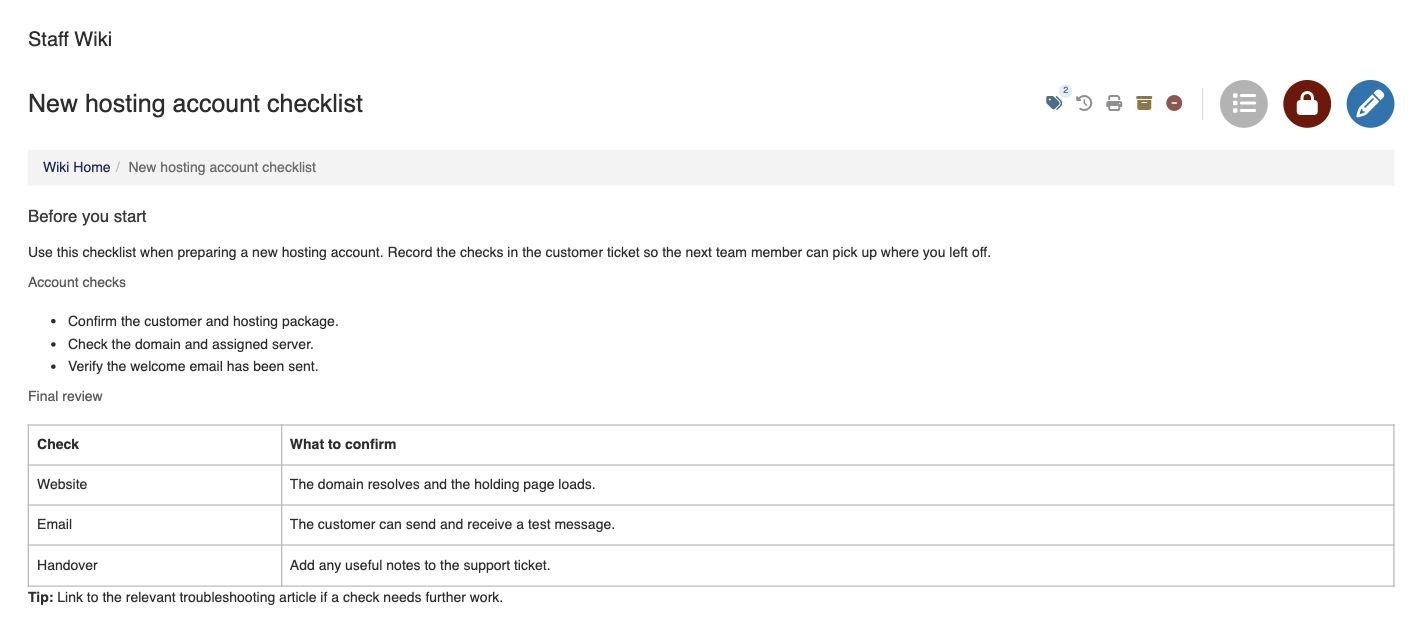
Use the green plus icon to create an article or category. Categories can contain subcategories; an article can belong to more than one category.
Open an article and choose Edit. Enter its title, select an editor and save your changes. Staff Wiki includes Jodit, Summernote Lite, Trumbowyg and ContentTools. You can switch editors while editing; review the formatting before saving.
Use the category icon to choose an article's categories. Use the Tags icon to add or remove tags. The icon shows the number of tags.
Search opens from the round search icon. Filters lets you narrow results by author, tags or status. All includes active, archived and trashed articles that you are allowed to access.
History, drafts and restoration
History shows earlier saved versions and any available unsaved draft. Restore a saved revision to return to earlier content. A changed article is saved as a new revision; saving without changes does not add another revision.
Draft recovery depends on the browser and device where you were editing. It is a convenience, not a replacement for saving or backups.
Archive removes an article from the normal active list. Move to trash retains it for recovery. Use Filters > Show to find archived or trashed articles, open one and use its Restore action. If another administrator changes an article while you edit it, reload and review the saved version before replacing it.
Permissions and files
Administrator permissions
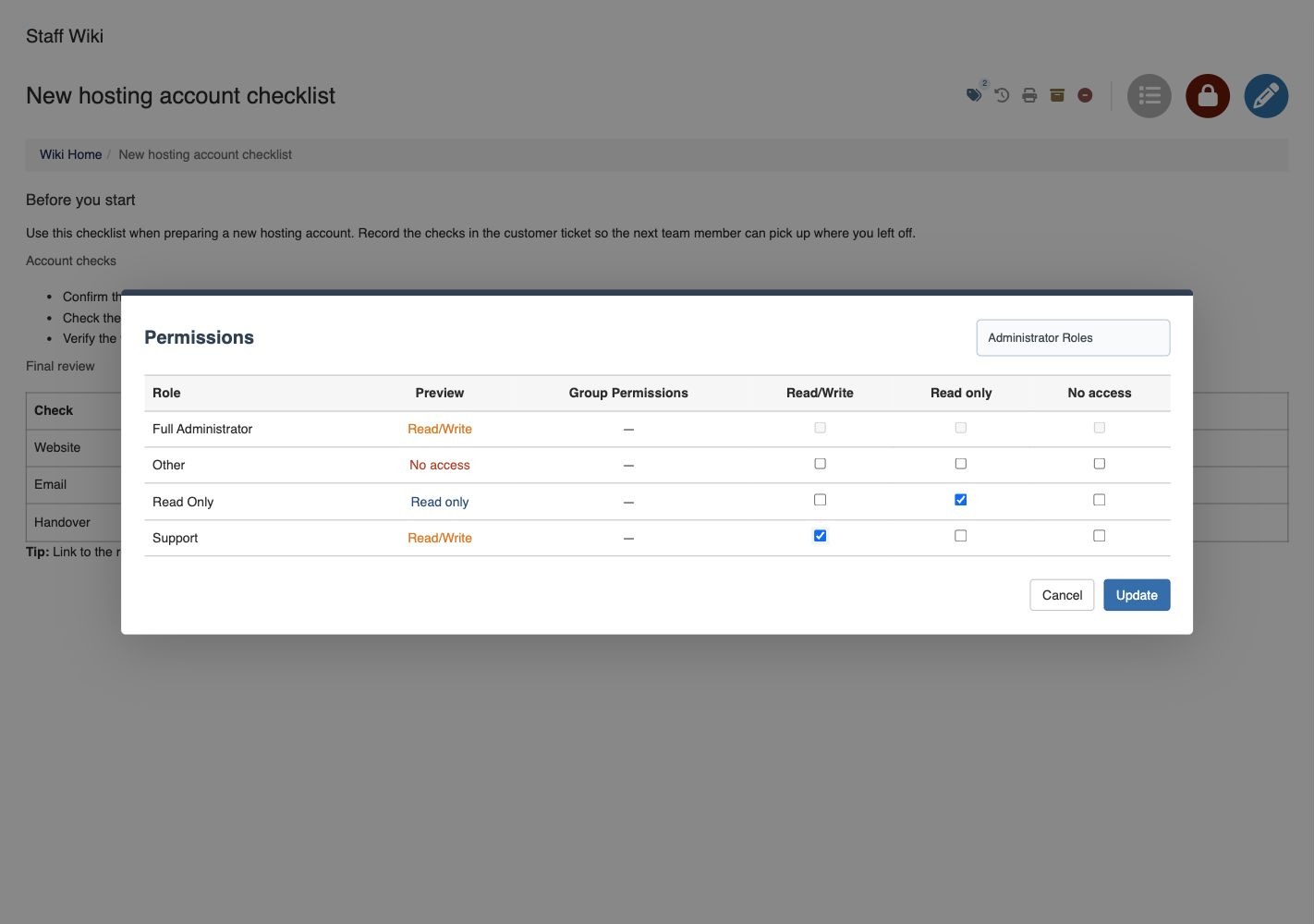
WHMCS addon access controls which administrator roles can enter Staff Wiki. Wiki permissions then control access to categories and articles.
Use the lock icon to set Read/Write, Read only or No access for administrator roles or individual users. The preview shows the effective result. Child categories and articles can inherit permissions; an explicit article or user rule can override an inherited rule. Check the preview after making a change.
Wiki settings, backups and permission management are restricted to Wiki managers. The Full Administrator role is a manager by default. Read-only users cannot change articles or upload files. Search and file downloads respect article and category access.
Image and attachment uploads
While editing, use the paperclip icon to add an image or file. Images can also be inserted using the selected editor's image controls. Wait for uploads to finish before saving.
Settings controls the allowed image and attachment extensions and maximum size per file. The hosting server's PHP upload limits can impose a lower limit. Unsupported or mismatched files are rejected.
Uploads are kept in private whmcsnow-staffwiki-files storage alongside the WHMCS web root, rather than as public attachment links. Access is checked through Staff Wiki. Keep this private directory in your hosting backups.
For older installations, Settings > Maintenance can copy existing images into private storage. Do not delete old uploads or change their paths manually during migration.
Settings and backups
Settings and interface languages
Settings lets Wiki managers choose the default editor, interface language, category columns, article ordering, upload extensions and maximum upload size.
The interface supports English, French, German, Spanish and Arabic. Choose Use administrator language to follow the administrator's WHMCS language, with English as the fallback. Arabic uses a right-to-left interface. Changing the interface language does not translate article content.
Backup & Restore (Beta)
Backup & Restore remains Beta. Keep an independent hosting/database backup before relying on a restore.
Download backup creates a ZIP containing Wiki articles, categories, permissions, supported settings and uploaded files. It also contains an HTML export of each article for reference. These HTML exports are not a complete standalone website; protected file links still depend on WHMCS. Licence keys are not included.
To restore a current-format Staff Wiki backup, choose Restore backup, select its ZIP and type RESTORE. Restoration replaces Wiki articles, categories, permissions and supported settings. A safety backup is kept privately on the server before changes are applied. Check the restored articles, access rules and attachments afterwards.
The upload limit is 128 MB and server limits may be lower. Old SQL-only backups are not accepted by this restore dialog; ask your hosting administrator to restore those separately. Do not upload an unrelated WHMCS database backup or a ZIP of addon code.