Getting started
Installation and upgrades
Back up WHMCS files and the database. Upload modules/addons/ticketshield/ to the matching WHMCS directory. Include includes/whmcsnowcore.php if the WHMCSnow licensing dependency is not already installed. Do not overwrite an existing shared licensing dependency during a routine addon upgrade; use a build compatible with the installed PHP version.
Activate TicketShield under Configuration > System Settings > Addon Modules and allow the required administrator roles. Open Addons > TicketShield and enter a TicketShield licence. Community sharing starts off and Quarantine is the default mode.
On upgrades, apply Update TicketShield storage in Settings if offered. Only TicketShield-owned mod_whmcsnow_ticketshield_ tables are updated. Deactivation retains addon data. Keep WHMCS database backups and its encryption configuration together securely: they are needed to read encrypted local previews.
PHP requires cURL, OpenSSL, JSON and the ionCube Loader required by WHMCSnow licensing. Use a version supported by WHMCS and the licensing build. Automated addon checks cover PHP 7.4, 8.1, 8.2 and 8.3; custom ticket integrations need their own checks.
Activating your licence
Open Addons > TicketShield and enter the licence key from your WHMCSnow service. The key belongs to your installation; do not post it in public support requests.
After successful activation, the addon opens normally and the licence form disappears. If activation fails, check the key, the licence status in WHMCSnow and your installation details. Your server must be able to connect to WHMCSnow over HTTPS.
Licence validation is separate from optional community sharing. A licence does not automatically enable sharing. If you move WHMCS to another domain or directory, check the licence restrictions and contact WHMCSnow if it needs reissuing. Never disable certificate checks to work around a connection problem.
14-day local trial
You can start a 14-day local trial from the TicketShield activation screen without entering a product licence key. The trial uses local reports, matching and quarantine. Community sharing, community signature matching and community sync are unavailable until you activate a valid TicketShield licence.
The addon shows the time remaining and an activation link. Once the trial ends, protection pauses and new tickets continue to arrive normally. You can still review and restore quarantined messages for as long as they remain within your configured retention period. Activating a licence keeps your settings, reports and saved messages; community sharing remains your choice. Trials are tracked by WHMCSnow and cannot be restarted by reinstalling the addon.
Setting up automatic sync
The TicketShield sync cron is a separate job from the main WHMCS cron. We recommend running it every five minutes; this is a suggested schedule, not a fixed requirement.
- Enable Community sharing in TicketShield > Settings and save your settings. The Community sync panel will then appear. Open Community sync > Set up automatic sync.
- Copy the full command shown for your installation. It includes the absolute path to modules/addons/ticketshield/cron.php.
- Open Cron Jobs in your hosting control panel. For the recommended five-minute schedule, choose: */5 * * * *.
- Paste the command into the command field. Use PHP CLI, with the same PHP version as your WHMCS cron, and run it as the hosting account.
If the control panel has separate schedule fields, enter */5 for minute and * for hour, day, month and weekday. Do not paste the schedule into the command field as well.
Example only: /path/to/php -q /home/account/public_html/modules/addons/ticketshield/cron.php
Do not call this file through a public web URL. Settings records Last cron run and Last successful sync separately. Sync now checks the connection but does not update the cron heartbeat. With sharing enabled, TicketShield warns if cron has never run or is more than 24 hours overdue.
The Community tab and sync panel are hidden while community sharing is off. No community signatures are matched and no updates are sent or downloaded. Local reports continue to work.
Protection modes and first checks
Quarantine: matching messages do not create a ticket. Their encrypted text is kept in Quarantine and can be restored to the support queue. This is the default mode.
Blocked: matching messages do not create a ticket. Activity records the decision, but no message is kept for restoration.
Paused: messages are not scanned and tickets are created normally without spam protection.
Quarantine and Blocked use the documented TicketPiping and TicketOpenValidation hooks for imported emails and new customer tickets. Piped replies can be restored to their original thread when the sender can be verified. Web customer replies and custom integrations that bypass these hooks continue through WHMCS. Admin/API requests marked as admin bypass blocking.
Attachments are not archived; messages with detectable attachments are allowed through to avoid losing files. An unknown department, unavailable licence or failed decision save also allows normal processing.
Using TicketShield
Reporting and retracting spam
Use the TicketShield action on the WHMCS ticket page to report a spam message. It starts matching locally immediately. You can delete the original ticket afterwards: the report retains its local fingerprint and encrypted preview.
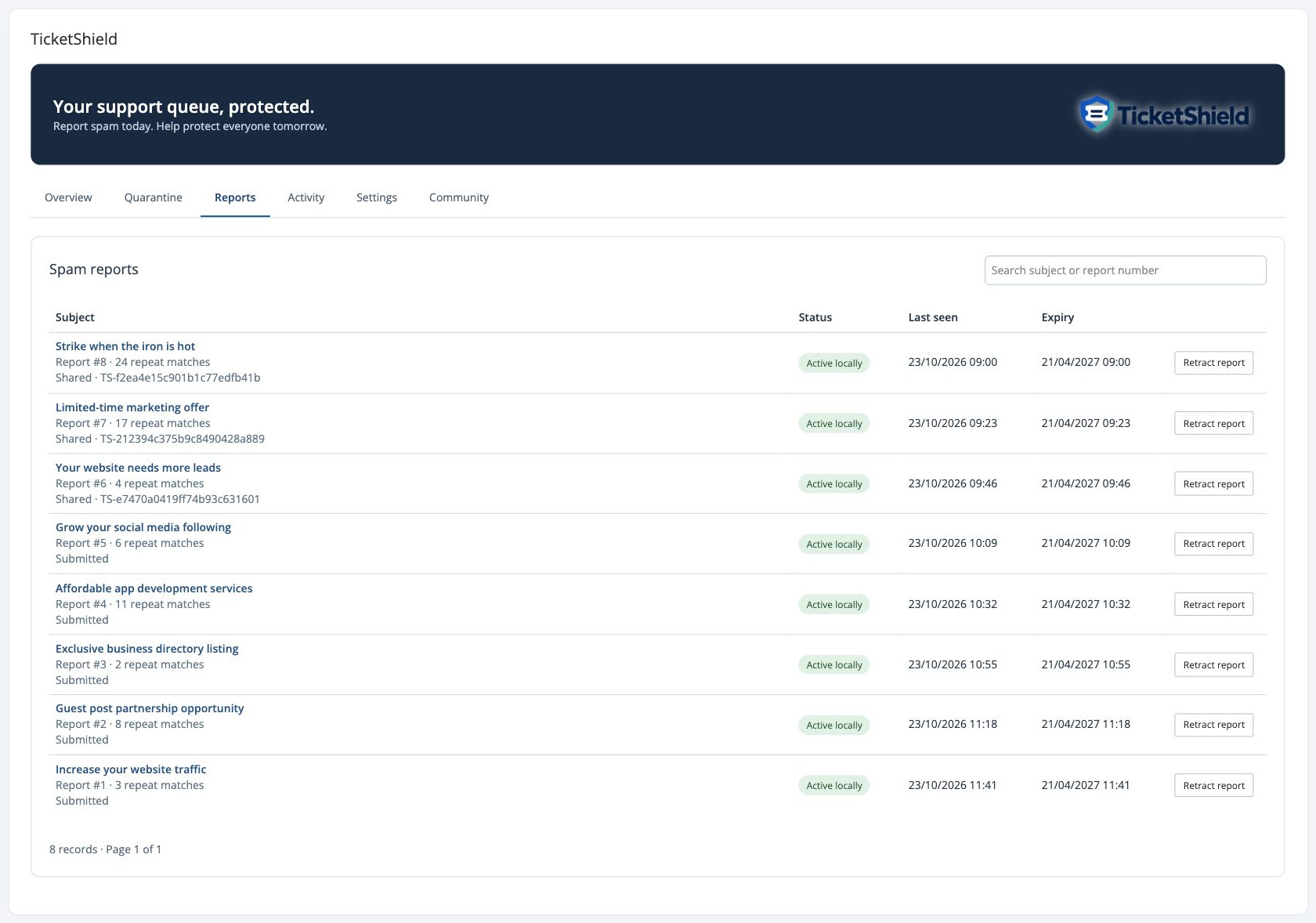
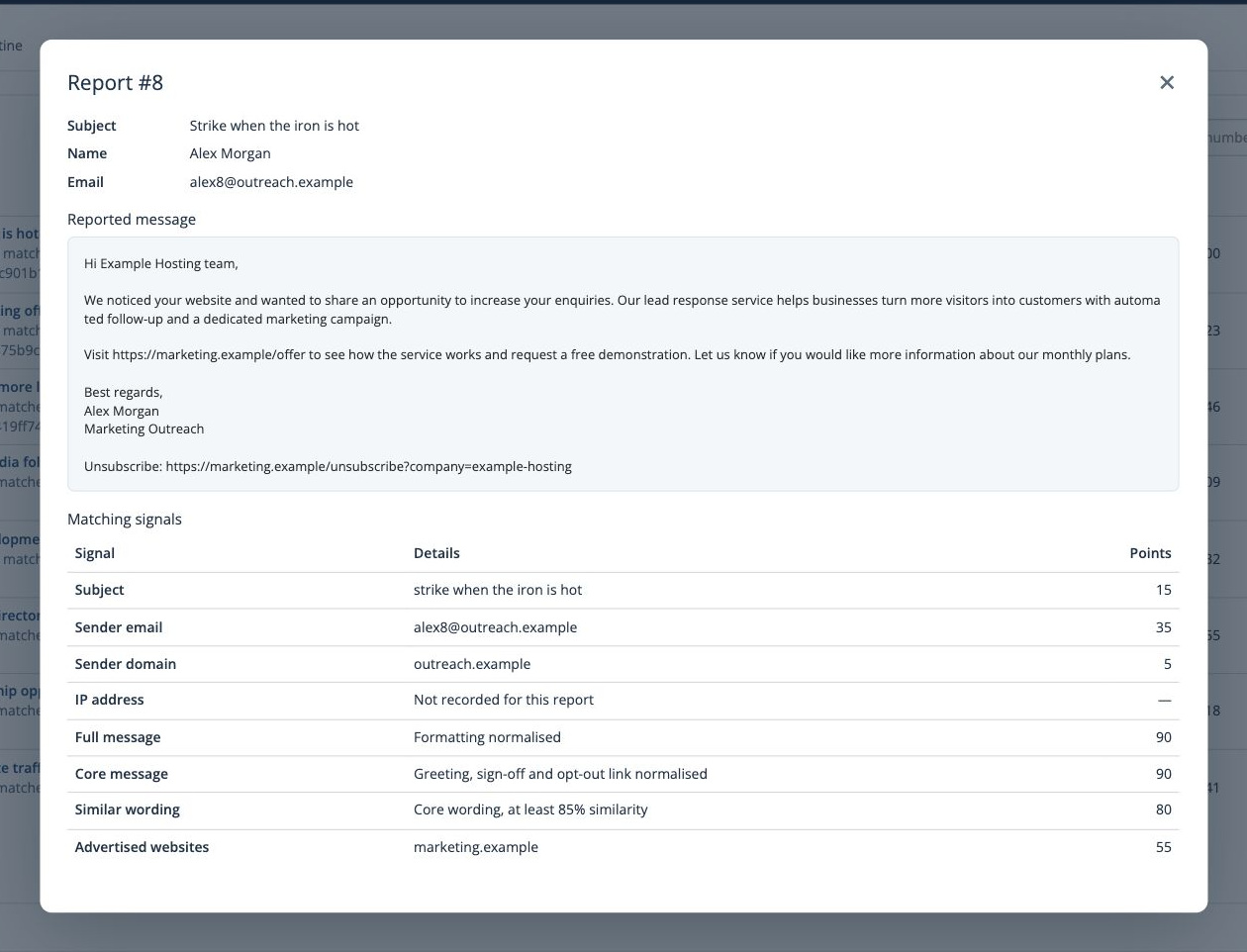
Open Reports to search by subject or report number, inspect the saved message and review its matching signals. Very similar local reports are grouped while their individual fingerprints are retained.
Retract a report when it should no longer contribute to matching. Retracted reports can be reactivated from Reports. With community sharing enabled, retractions are queued for the next successful sync. Reporting a ticket does not automatically put it into Quarantine; future matching incoming messages are reviewed there.
Scores and matching signals
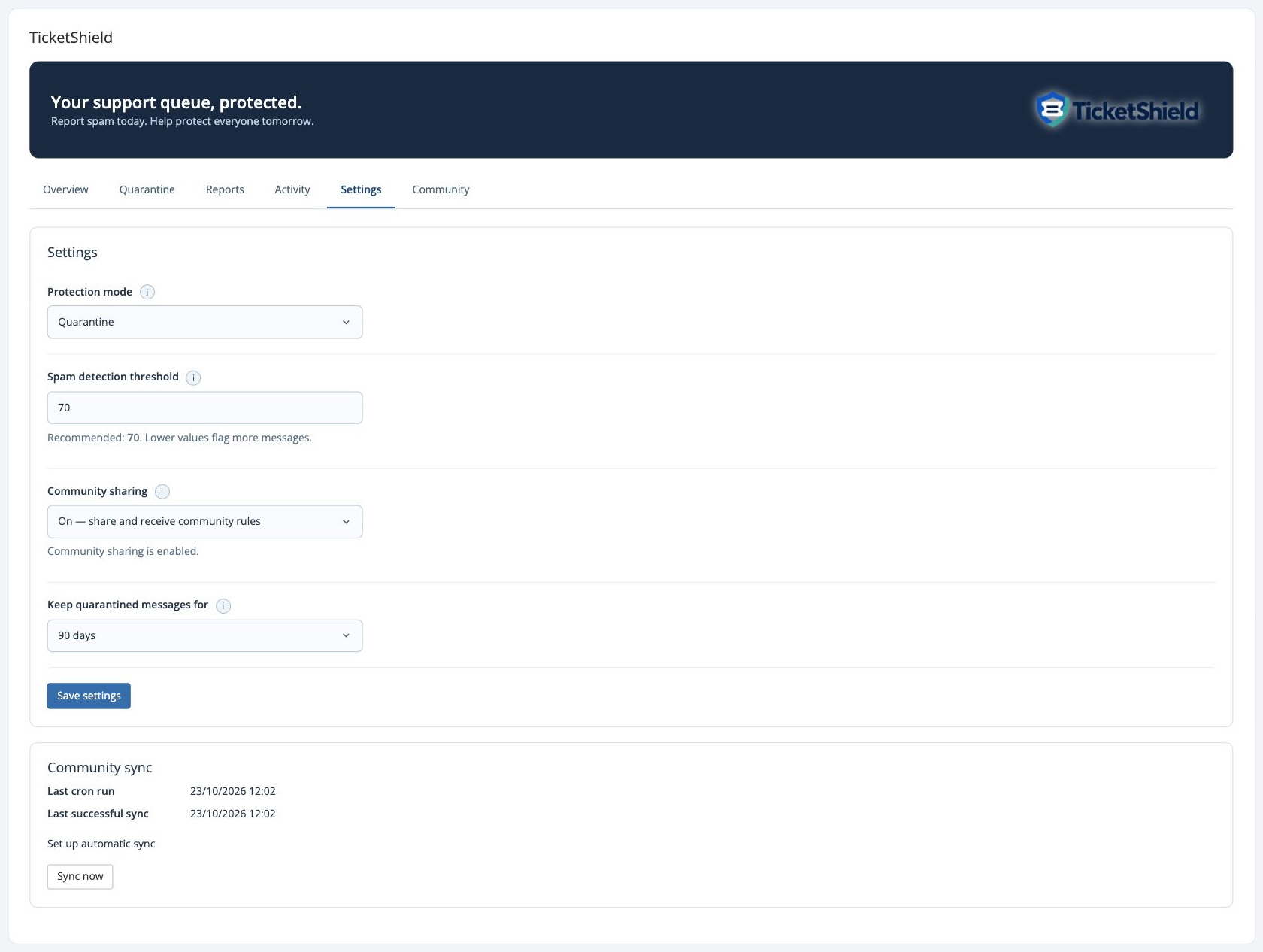
The default detection threshold is 70. A lower threshold flags more messages; a higher threshold requires stronger evidence.
Local signals include normalised message content, similar wording, advertised websites, exact sender email, subject, sender domain and eligible source IP. Body scores are not added together, email/domain points are not double-counted, and the total is capped at 100. Shared email-provider domains such as Gmail do not earn domain points.
Current weights: exact message 90; similar message 80; advertised website 55; exact sender email 35; subject 15; sender domain 5; eligible source IP 5. Combining signals can raise the total above a single signal. The Settings tooltip lists the weights.
Community signatures use the same weighted matching rules: exact or normalised message 90, similar wording 80, advertised website 55, sender email 35, subject 15, eligible sender domain 5 and trusted IP 5. Matching patterns are verified against reports from other community users before publication. Factors from the same reported message are compared together; unrelated signatures are not added together. Short messages can still match a website, subject or sender even when they are too short for body matching.
Activity and quarantine
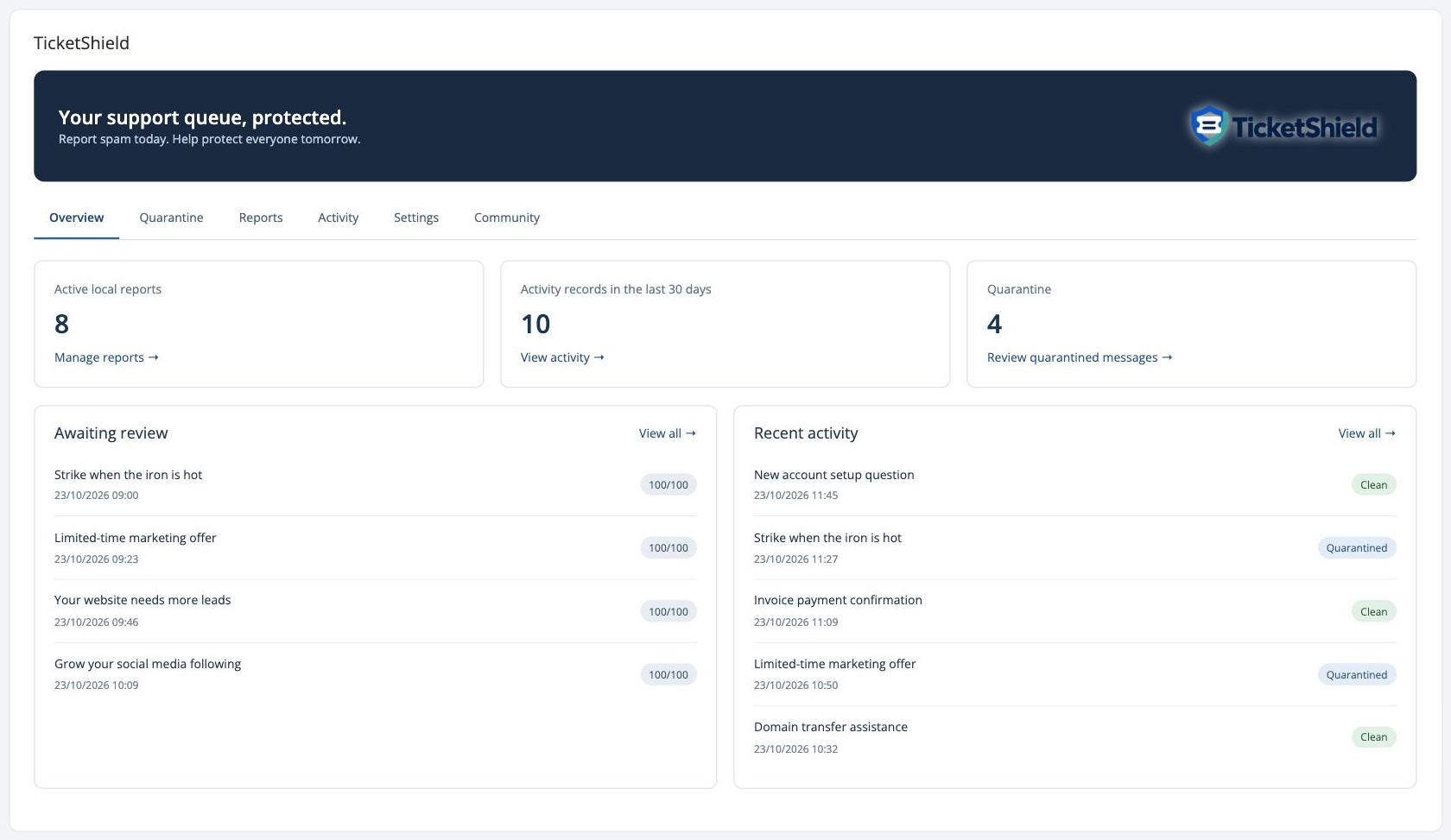
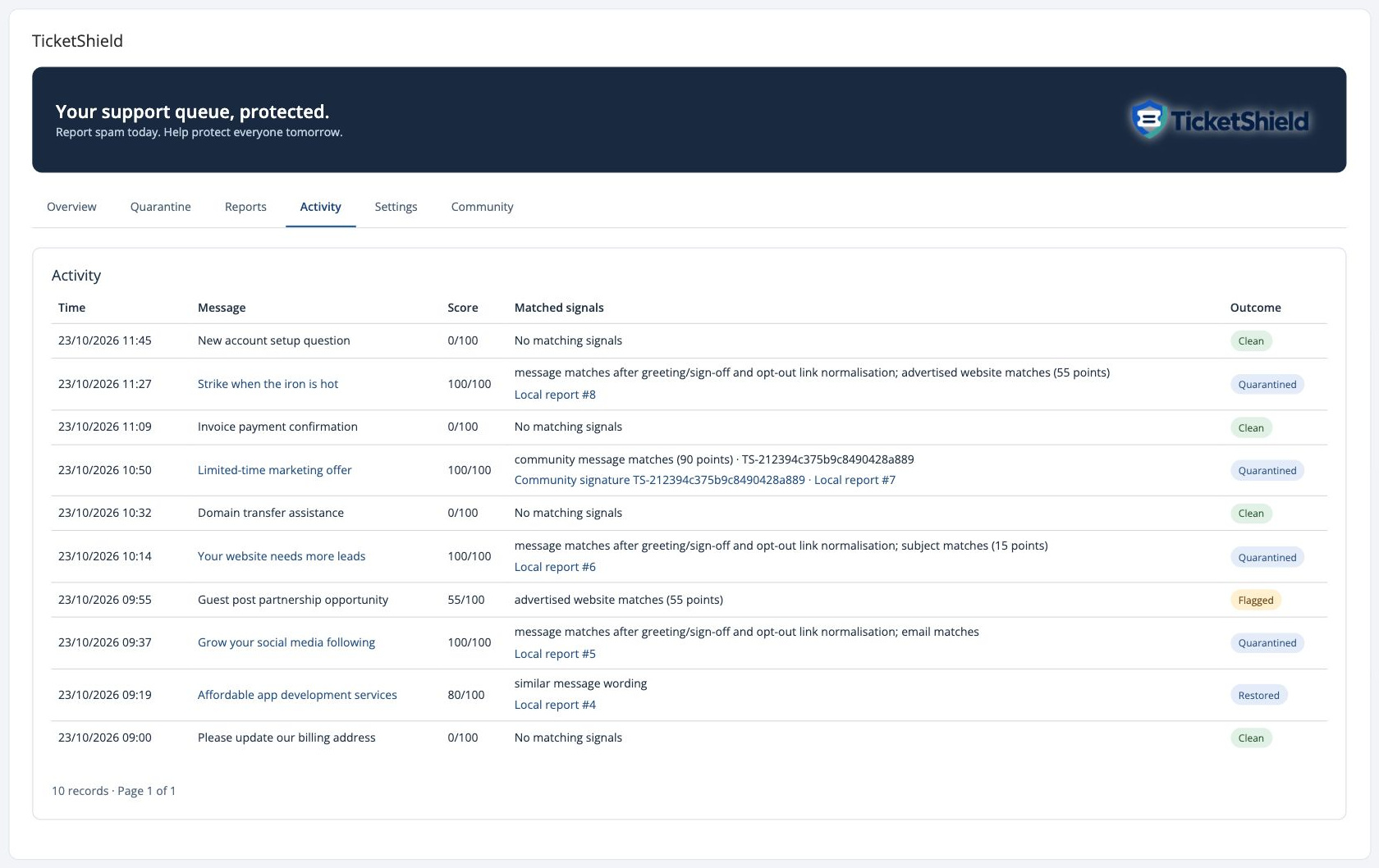
Activity records incoming tickets and customer replies while monitoring is enabled, including messages with no matching signals. The view refreshes automatically.
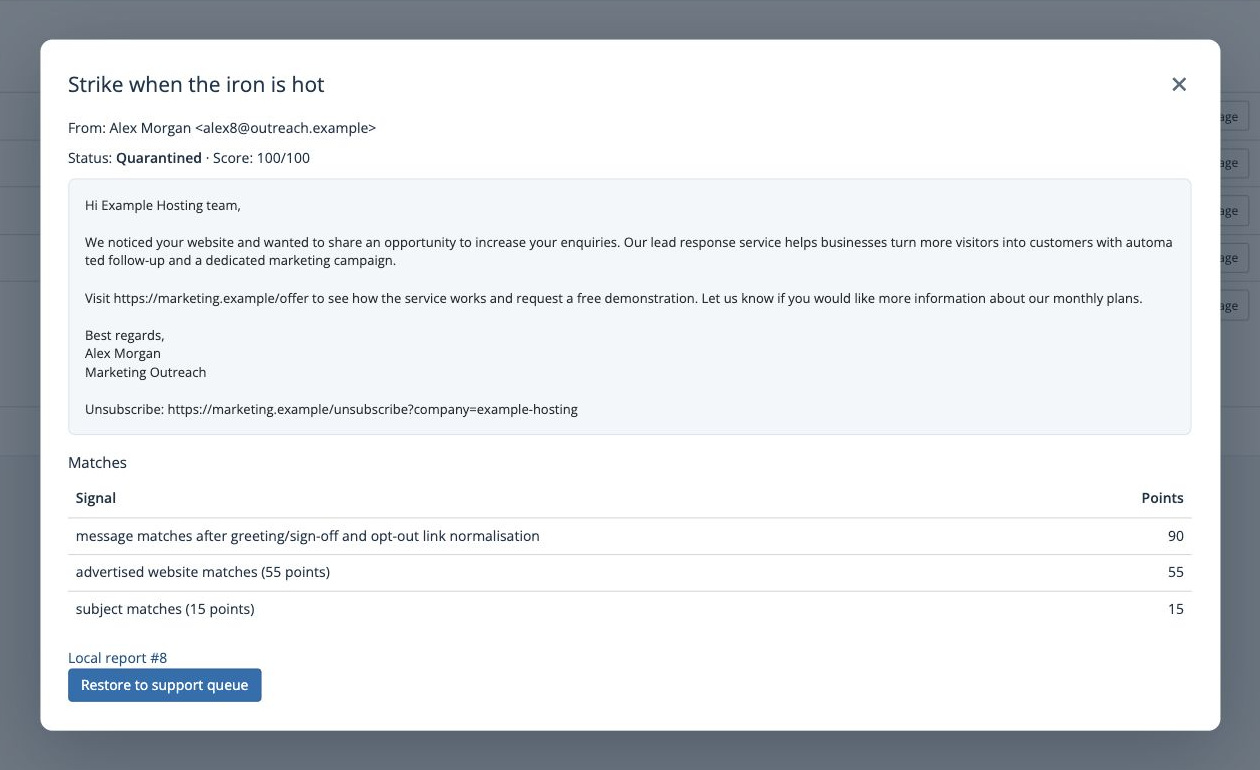
Clean means no signal matched. Flagged means signals matched without a current quarantined item. Quarantined means a saved message is available for review. Blocked means no ticket was created and no message was kept for restoration. Restored marks a message returned to the support queue. Open the outcome to view the available ticket or quarantined message.
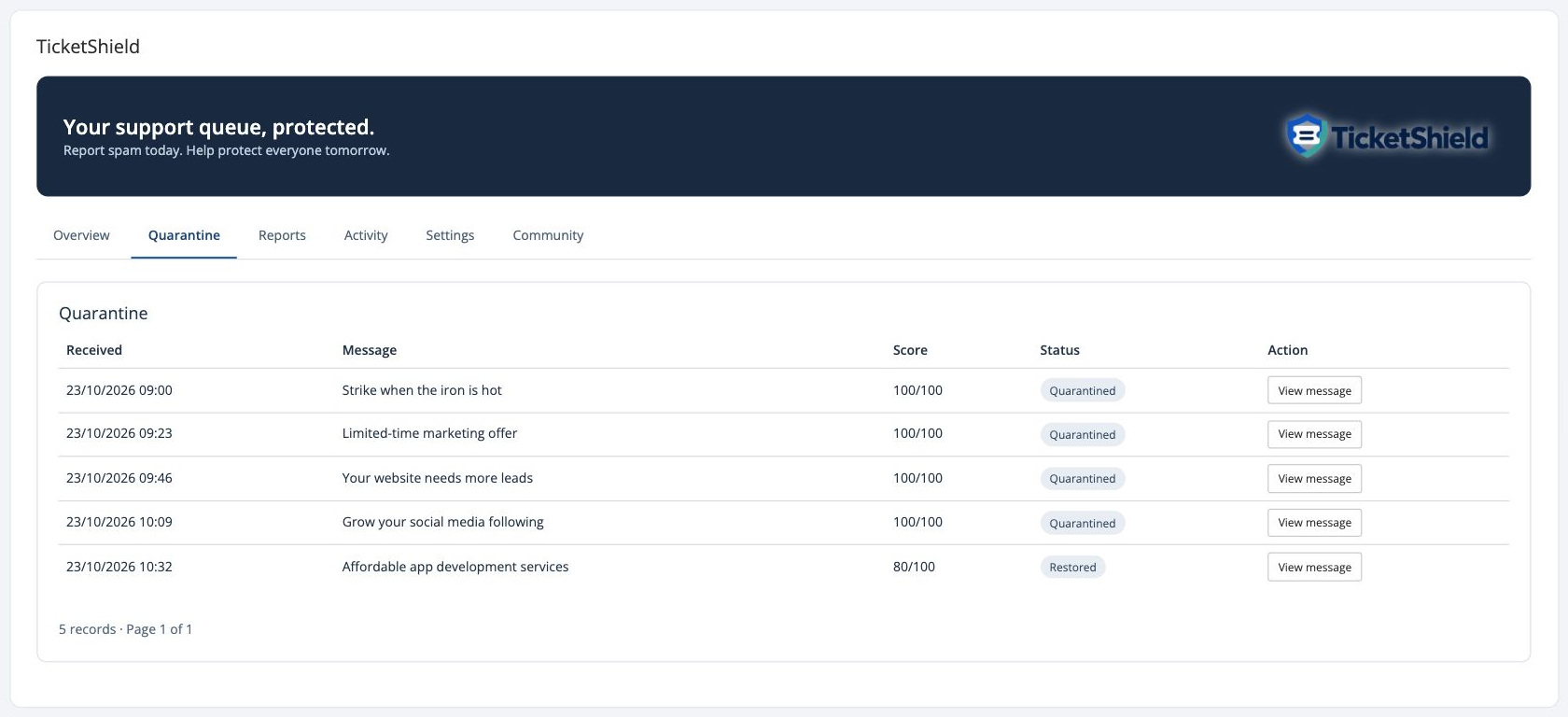
In Quarantine, choose View message to inspect the sender, subject, body, score and matches. Restore to support queue creates a ticket from a held message, or adds a held reply back to its existing ticket where possible. Older items that already have a ticket reuse it. A restored item cannot be restored repeatedly. Restoring does not create another Activity scan.
Attachments are not archived. If the original has been deleted and restoring would lose its attachment, automatic restoration is unavailable.
Retention and expiry
Local report fingerprints expire after 180 days without a strong repeat match. Strong local sightings queue a central renewal, including pending submissions, at most once daily per report. Strong downloaded-signature sightings also renew central expiry without adding votes. Regular updates distribute renewed expiry and withdrawals.
Expiry applies to a reported matching combination, rather than separately to each component. Weak matches do not renew it. The normal WHMCS daily cron removes expired local report evidence and queues any required community withdrawal. Activity is retained for 30 days; Settings offers 30, 90 or 180 days for quarantined messages. Interrupted restores stay available for manual review.
The Hub withdraws expired signatures and removes their matching payloads after a further 30 days. Minimal opaque source/sequence and withdrawal markers remain to prevent old queued retries reviving removed data and to update installations which were offline. Database backups and server logs have separate operator-managed retention.
Community sharing
Data sharing and privacy
Community sharing starts off. You can use local reporting and matching without it. Enabling sharing queues eligible existing reports and future reports.
TicketShield sends separate, versioned fingerprints for the subject, sender email, eligible sender domain, trusted IP metadata, full and normalised message, advertised website hosts and a bounded sample of five-word phrases. Known recipient branding is normalised consistently before community message matching. The sender name is not a matching factor.
Original subjects, message text, sender names, email addresses, IP addresses, attachments and local ticket numbers are not uploaded as readable values. Matching fingerprints and word counts are linked privately to the authenticated licence and service, with opaque report references and sequence numbers. Original previews remain encrypted on your installation.
Fingerprints are pseudonymous, not guaranteed anonymous. Subject, address, website and phrase fingerprints can be tested against guessed values by someone who knows the protocol. Sharing requires appropriate privacy information, a lawful basis, retention and access controls; hashing alone does not establish GDPR compliance.
Similar or matching reports from other users help verify spam patterns before they are shared. Unverified matching information is excluded. Other installations receive signed matching signatures and counts, without contributor account references.
How the data is protected
Community transfers use HTTPS with certificate verification. Signature downloads are digitally signed and verified before they are accepted. TicketShield encrypts its saved message previews locally using WHMCS encryption. These safeguards protect the transfer, update integrity and local previews; they do not mean that community fingerprints are encrypted or anonymous.
Reporting account and licence links are kept privately by WHMCSnow to authenticate submissions and prevent abuse. They are not included in the signatures distributed to other installations. Normal connection metadata, including the connecting server IP, is still visible to the hosting service.
GDPR responsibilities
Choosing to enable sharing is not consent from the people who sent the original messages. Each participating organisation needs an appropriate lawful basis, suitable privacy information and procedures for retention and rights requests. A blanket GDPR-compliance guarantee would not follow from using hashes or installing TicketShield. For questions or rights requests about centrally held community data, contact WHMCSnow through its support form; contact the receiving business about its locally held tickets.
Publication and your own reports
Your local report is active immediately. When other users report similar or matching spam, their reports help verify the pattern before it is shared with participating installations.
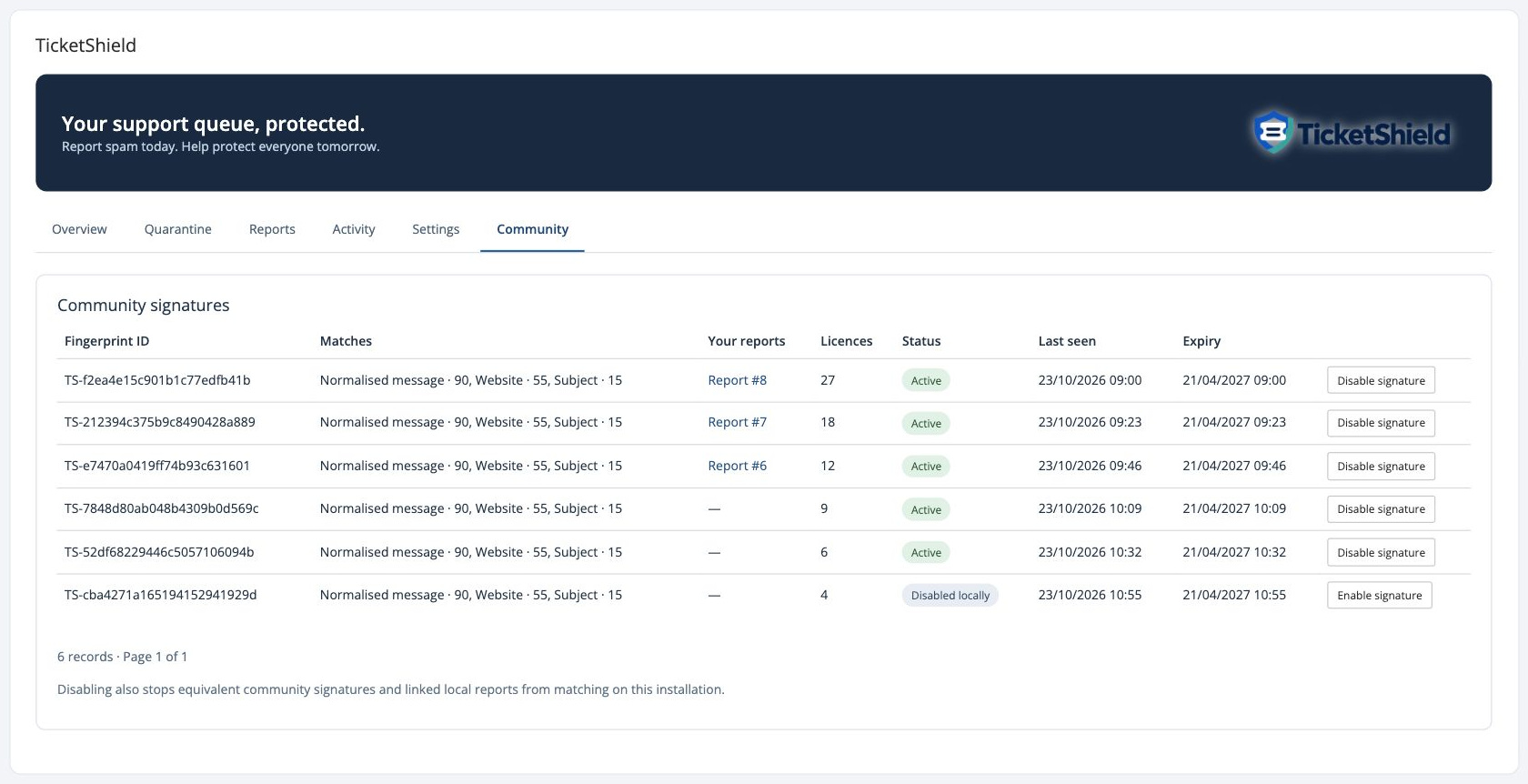
Reports shows your submission status and returned TS fingerprint ID. Community shows downloaded signatures and links associated own reports. A signature may contain only its corroborated website and subject when the senders or message bodies differ. Similar wording can qualify through corroborated phrase fingerprints; an identical full body is not required.
Each original matching combination is scored separately using the local weighting rules. Website points are counted once, body matches are alternatives, shared email-provider domains do not contribute domain points and exact email/domain points are not counted together. The best matching signature is used; scores from unrelated signatures are not added together.
The scheduled sync uploads queued contributions and downloads signed changes. Every five minutes is recommended. Incoming tickets are checked locally, so a temporary API outage keeps reports queued and does not block ticket delivery. Existing saved reports are requeued automatically when upgrading to the new sharing format.
False positives and disabling signatures
Activity and quarantined messages link to the community signature responsible for a match. Open it in Community and choose Disable signature. One action stops equivalent downloaded signatures and linked local reports from matching on your installation, survives subsequent syncs and can be reversed with Enable signature.
Disabling is a local preference. It does not retract your contribution or disable protection for other customers. Retract a local report to withdraw its contribution. The Hub re-evaluates publication after sync; patterns which no longer meet the community verification requirements are withdrawn.
Use the threshold in Settings to adjust how much evidence is required. Scores from unrelated signatures are not added together. Review Quarantine before enabling Blocked mode.
Sync health and turning sharing off
Settings shows Last cron run, Last successful sync and any connection error. These are separate: a recent cron time does not mean a request succeeded. A warning appears when sharing is enabled and the cron has not run for 24 hours.
Check the displayed command, PHP CLI version, cURL/OpenSSL, server clock and outbound HTTPS access to WHMCSnow. Sync now tests the connection. Failures retain queued changes and retry with increasing delays; overlapping syncs are prevented. Do not disable HTTPS verification.
Turning sharing off stops uploads, downloads and community matching. Unsent active uploads are removed; pending withdrawals remain queued without being sent until sharing is enabled again. Previously accepted contributions remain on the Hub until withdrawal or expiry. Re-enabling reconciles active and retracted reports. Local protection continues unless its mode is Paused.
The Community tab and sync panel are hidden while community sharing is off. No community signatures are matched and no updates are sent or downloaded. Local reports continue to work.